Loading...

This presentation is an HTML5 website

Press key to advance.

Having issues seeing the presentation? Read the disclaimer

Slides controls
  • and to move around.
  • Ctrl/Command and + or - to zoom in and out if slides don’t fit.
  • S to view page source.
  • T to change the theme.
  • H to toggle syntax highlight.
  • N to toggle speaker notes.
  • 3 to toggle 3D effect.
  • 0 to toggle help.

Quick Introduction to HTML5*

Web Development to the next level

*Including other next generation technologies of the Web Development stack

These Slides are from

HTML5Rocks.com

I just modified them a bit for this class

Rough Timeline of Web Technologies
  • 1991 HTML
  • 1994 HTML 2
  • 1996 CSS 1 + JavaScript
  • 1997 HTML 4
  • 1998 CSS 2
  • 2000 XHTML 1
  • 2002 Tableless Web Design
  • 2005 AJAX
  • 2009 HTML 5
HTML5 ~= HTML + CSS + JS

Today, we will cover...

Semantics & Markup

More meaningful elements

HTML5 Semantics & Markup
HTML

Better semantic tags

<body>
  <header>
    <hgroup>
      <h1>Page title</h1>
      <h2>Page subtitle</h2>
    </hgroup>
  </header>

  <nav>
   <ul>
     Navigation...
   </ul>
  </nav>
  <section>
   <article>
     <header>
       <h1>Title</h1>
     </header>
     <section>
       Content...
     </section>
   </article>
   <article>
     <header>
       <h1>Title</h1>
     </header>
     <section>
       Content...
     </section>
   </article>
  </section>

  <aside>
   Top links...
  </aside>

  <figure>
    <img src="..."/>
    <figcaption>Chart 1.1</figcaption>
  </figure>

  <footer>
   Copyright ©
<time datetime="2010-11-08">2010</time>. </footer> </body>
HTML

Markup for applications

<input list="cars"/>
<datalist id="cars">
  <option value="BMW"/>
  <option value="Ford"/>
  <option value="Volvo"/>
</datalist>


<menu>
  <command type="command" disabled label="Publish" />
</menu>

<details>
  <summary>HTML 5</summary>
  This slide deck teaches you everything you need to know about HTML 5.
</details>
HTML 5This slide deck teaches you everything you need to know about HTML 5.
<meter min="0" max="100" low="40" high="90" optimum="100" value="91">A+</meter>
Your score is: A+
<progress>working...</progress> Download is: working...
<progress value="75" max="100">3/4 complete</progress> Goal is: 3/4 complete
HTML

New form types

<style>
  [required] {
    border-color: #88a;
    -webkit-box-shadow: 0 0 3px rgba(0, 0, 255, .5);
  }
  :invalid {
    border-color: #e88;
    -webkit-box-shadow: 0 0 5px rgba(255, 0, 0, .8);
  }
</style>
<input type="text" required />

<input type="email" value="some@email.com" />

<input type="date" min="2010-08-14" max="2011-08-14" value="2010-08-14"/>

<input type="range" min="0" max="50" value="10" />

<input type="search" results="10" placeholder="Search..." />

<input type="tel"  placeholder="(555) 555-5555"
         pattern="^\(?\d{3}\)?[-\s]\d{3}[-\s]\d{4}.*?$" />

<input type="color" placeholder="e.g. #bbbbbb" />

<input type="number" step="1" min="-5" max="10" value="0" />
HTML

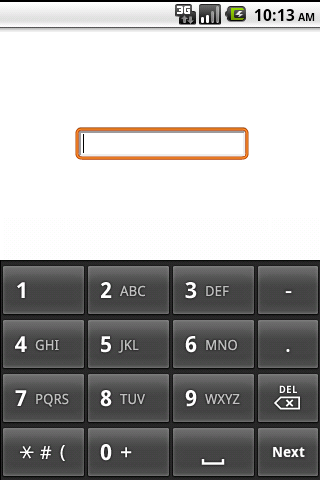
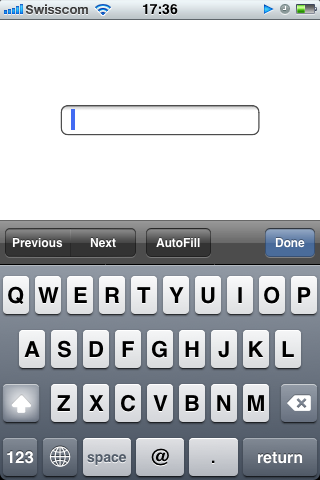
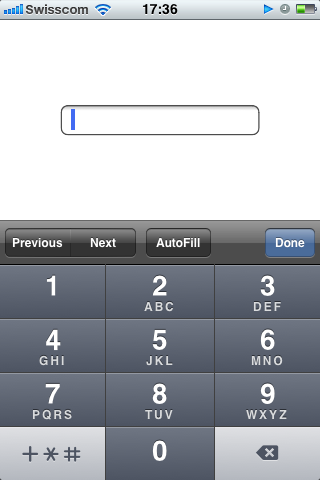
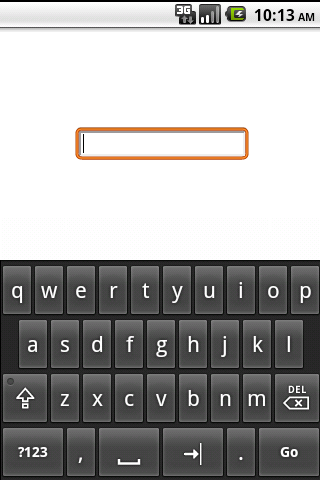
Form field types on mobile

type="text"
android keyboard on input type text
Android Device
type="number"
android keyboard on input type number
Android Device
type="email"
iphone keyboard on input type email
iPhone Device
type="tel"
iphone keyboard on input type tel
iPhone Device

Graphics / Multimedia

2D & 3D

HTML5 3D & Effects HTML5 Multimedia
HTML JS

Audio + Video

<audio id="audio" src="sound.mp3" controls></audio>
document.getElementById("audio").muted = false;
<video id="video" src="movie.webm" autoplay controls></video>
document.getElementById("video").play();
CSS JS

FullScreen API

if (elem.webkitRequestFullScreen) {
  elem.webkitRequestFullScreen(Element.ALLOW_KEYBOARD_INPUT);
} else if (elem.mozRequestFullScreen) {
  elem.mozRequestFullScreen();
} else if (elem.requestFullScreen){
  elem.requestFullScreen();
}
:-webkit-full-screen-ancestor:root {
  overflow: hidden;
}
:-webkit-full-screen-ancestor {
  z-index: auto;
  -webkit-transform: none;
  -webkit-transition: none;
}
pre:-webkit-full-screen {
  background-color: white;
}
close: 'ENTER' or 'ESC'

CSS3

Presentation & Styling

HTML5 Styling
CSS

CSS Selectors

Selectors

.row:nth-child(even) {
  background: #dde;
}
.row:nth-child(odd) {
  background: white;
}
Row 1
Row 2
Row 3
Row 4

Image-like display

div {
  display: inline-block;
}

Specific attributes

input[type="text"] {
  background: #eee;
}

Negation

:not(.box) {
  color: #00c; 
}            
:not(span) {
  display: block; 
}  

More specific targetting

h2:first-child { ... }

div.text > div { ... } 
h2 + header { ... } 
CSS

Webfonts

@font-face {
  font-family: 'LeagueGothic';
  src: url(LeagueGothic.otf);
}

@font-face {
  font-family: 'Droid Sans';
  src: url(Droid_Sans.ttf);
}

header {
  font-family: 'LeagueGothic';
}
LeagueGothic font with no image replacement
CSS

Text wrapping

div {
  text-overflow: ellipsis;
}
A long cold winter delayed the blossoming of the millions of cherry, apricot, peach, and prune plum trees covering hundreds of square miles of the Valley floor. Then, unlike many years, the rains that followed were light and too early to knock the blossoms from their branches.

Play with the slider on this and further pages!

CSS

Columns

-webkit-column-count: 2; 
-webkit-column-rule: 1px solid #bbb;
-webkit-column-gap: 2em;

In March 1936, an unusual confluence of forces occurred in Santa Clara County.

A long cold winter delayed the blossoming of the millions of cherry, apricot, peach, and prune plum trees covering hundreds of square miles of the Valley floor. Then, unlike many years, the rains that followed were light and too early to knock the blossoms from their branches.

Instead, by the billions, they all burst open at once. Seemingly overnight, the ocean of green that was the Valley turned into a low, soft, dizzyingly perfumed cloud of pink and white. Uncounted bees and yellow jackets, newly born, raced out of their hives and holes, overwhelmed by this impossible banquet.

Then came the wind.

It roared off the Pacific Ocean, through the nearly uninhabited passes of the Santa Cruz Mountains and then, flattening out, poured down into the great alluvial plains of the Valley. A tidal bore of warm air, it tore along the columns of trees, ripped the blossoms apart and carried them off in a fluttering flood of petals like foam rolling up a beach.

This perfumed blizzard hit Stevens Creek Boulevard, a two-lane road with a streetcar line down its center, that was the main road in the West Valley. It froze traffic, as drivers found themselves lost in a soft, muted whiteout. Only the streetcar, its path predetermined, passed on...

CSS

Text stroke

div {
  -webkit-text-fill-color: black;
  -webkit-text-stroke-color: red;
  -webkit-text-stroke-width: 0.00px; 
}
Text stroke example
CSS

Opacity

  color: rgba(255, 0, 0, 0.75); 
  background: rgba(0, 0, 255, 0.75); 
Independent opacity
CSS

Hue/saturation/luminance color

color: hsla(
  128 
  74% 
  33% 
  1.00 
        
HSL example
CSS

Rounded corners

              face: border-radius: 0px; 
              left eye: border-radius: 0px; 
              right eye: border-radius: 0px; 
              base white: border-radius: 0px; 
              mouth: border-radius: 0px; 
              nose: border-radius: 0px; 
              left black eye: border-radius: 0px; 
              right black eye: border-radius: 0px; 
            
CSS

Gradients

background-image: linear-gradient(top, #00abeb 0%, #fff 50%,
                            #66cc00 50%, #fff 100%);

background-image: radial-gradient(center, circle cover, red, #000 40%);
                                                        
CSS

Shadows

text-shadow: 
  rgba(64, 64, 64, 0.5) 
  0px 
  0px 
  0px; 

box-shadow: rgba(0, 0, 128, 0.25) 0px 0px 0px;
Shadows example
CSS

Media Queries

CSS Media Queries Allow you to change your site based on size of the screen viewing it

@media screen and (max-width:480px){
	#container { width: 400px; }
	#nav{
		float: none;
		width: auto;
	}
	.feature-image { display: none; }
}
@media screen and (max-device-width: 480px){
  /* some CSS here */
}

@media screen and (max-device-width: 480px) and (orientation: portrait){
  /* some CSS here */
}

They are awesome for making mobile sites!

CSS

Transitions

#box.left {
  margin-left: 0;
}
#box.right {
  margin-left: 1000px;
}

document.getElementById('box').className = 'left'; 
document.getElementById('box').className = 'right'; 
#box {
  -webkit-transition: margin-left 1s ease-in-out;
}

document.getElementById('box').className = 'left'; 
document.getElementById('box').className = 'right'; 
CSS

Transforms

Hover over me:

-webkit-transform: rotateY(45deg);
-webkit-transform: scaleX(25deg);
-webkit-transform: translate3d(0, 0, 90deg);
-webkit-transform: perspective(500px)
#threed-example {
  -webkit-transform: rotateZ(5deg);

  -webkit-transition: -webkit-transform 2s ease-in-out;
}
#threed-example:hover {
  -webkit-transform: rotateZ(-5deg);
}

Now press 3!

CSS

Animations

@-webkit-keyframes pulse {
 from {
   opacity: 0.0;
   font-size: 100%;
 }
 to {
   opacity: 1.0;
   font-size: 200%;
 }
}

div {
  -webkit-animation-name: pulse;
  -webkit-animation-duration: 2s;
  -webkit-animation-iteration-count: infinite;
  -webkit-animation-timing-function: ease-in-out;
  -webkit-animation-direction: alternate;
}

*Please make a better use of it. We don't want a new blink tag ;)

Pulse!

File / Hardware Access

Deeper integration with the Operating System

HTML5 Device Access
JS

Geolocation

if (navigator.geolocation) {
  navigator.geolocation.getCurrentPosition(function(position) {
    var latLng = new google.maps.LatLng(
        position.coords.latitude, position.coords.longitude);
    var marker = new google.maps.Marker({position: latLng, map: map});
    map.setCenter(latLng);
  }, errorHandler);
}
HTML

Speech Input

<input type="text" x-webkit-speech />

Speech input is not enabled in your browser.
Try running Google Chrome with the --enable-speech-input flag.

HTML JS

Canvas 2D

<canvas id="canvas" width="838" height="220"></canvas>

<script>
  var canvasContext = document.getElementById("canvas").getContext("2d");
  canvasContext.fillRect(250, 25, 150, 100);

  canvasContext.beginPath();
  canvasContext.arc(450, 110, 100, Math.PI * 1/2, Math.PI * 3/2);
  canvasContext.lineWidth = 15;
  canvasContext.lineCap = 'round';
  canvasContext.strokeStyle = 'rgba(255, 127, 0, 0.5)';
  canvasContext.stroke();
</script>
HTML JS

Canvas example

HTML JS

Canvas 3D (WebGL)

<canvas id="canvas" width="838" height="220"></canvas>

<script>
  var gl = document.getElementById("canvas").getContext("experimental-webgl");
  gl.viewport(0, 0, canvas.width, canvas.height);
  ...
</script>
            

Nuts & Bolts

Improvements to the core platform

HTML5 Performance & Integration
JS

New Selectors

Finding elements by class (DOM API)

var el = document.getElementById('section1');
el.focus();

var els = document.getElementsByTagName('div');
els[0].focus();

var els = document.getElementsByClassName('section');
els[0].focus();

Finding elements by CSS syntax (Selectors API)

var els = document.querySelectorAll("ul li:nth-child(odd)");
var tds = document.querySelectorAll("table.test > tr > td");
var el = document.querySelector("table.test > tr > td"); // el == tds[0]
HTML JS

Custom data-* attributes

Define, store, and retrieve custom data on the DOM.

<div id="out" data-id="good" data-name="joe" data-screen-name="user1"></div>
// Add new data attributes via JS.
var el = document.querySelector('#out');
el.setAttribute('data-foo', 'bar');

var html = [];
for (var key in el.dataset) {
  html.push(key, ': ', el.dataset[key], '<br>');
}

el.innerHTML = html.join('');

Output:

id: good
name: joe
screenName: user1
foo: bar
JS

Element.classList

<div id="main" class="shadow rounded"></div>
var el = document.querySelector('#main').classList;
el.add('highlight');
el.remove('shadow');
el.toggle('highlight');

console.log(el.contains('highlight')); // false
console.log(el.contains('shadow')); // false
console.log(el.classList.toString() == el.className); // true

Output:

<div id="main" class="rounded"></div>

See it today?

  • Modern Browsers
  • Mobile Browsers

I want to play with the slides

My version of these slides is online here http://karlodwyer.github.com/quickintrotohtml5/

And you can get the source for them from https://github.com/karlodwyer/quickintrotohtml5

HTML5 ~= HTML + CSS + JS

HTML5 = Next Generation Features for Modern Web Development